360° Uniquizer — Create Unique Video Versions for TikTok & Reels

One creativeDozens of unique videos
Built for media buyers, affiliate teams and account networks. 360° Uniquizer changes video, audio and metadata so social platforms receive new unique files for TikTok, Reels and YouTube Shorts.
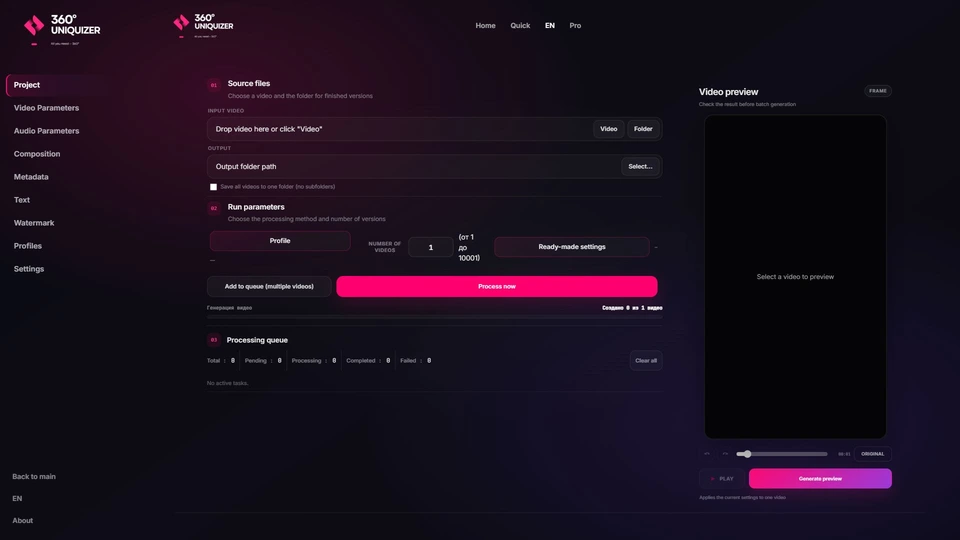

Find out if 360° Uniquizer is right for you
You work with video content
Traffic arbitrage, SMM, content creation — you need many unique videos to scale
You have a working funnel
You found what converts, now you need to upload more creatives to scale results
Tired of manual video editing
Manual processing takes hours. The program will create hundreds of unique versions while you focus on strategy
Program Features
35 Video Effects
Control color, geometry, blur, noise, stylization and frame-level transformations while preserving the quality you need.
14 Audio Effects
Combine pitch, speed, EQ, compression, echo, chorus and other audio adjustments independently from the picture.
Build new layouts
Picture-in-Picture, Split Screen and circular video. Control the background, position, size and crop inside the circle without rebuilding scenes manually.
Batch Processing
Queue multiple source files, create up to 10,000 versions in one task and use up to 32 processing threads.
Preview and Similarity Check
Preview the result and use visual similarity thresholds from 60–85% to reject versions that are too close.
All Formats
MP4, MOV, AVI, MKV, FLV, WMV, WEBM, M4V. Support for all popular video and audio formats. Auto-conversion when needed.
Build the full video frame inside the app
Choose a background and layout, place text and a watermark without another editor, then inspect the preview before processing the whole batch.
 Video effects and frame controls
 Audio effects and sound processing
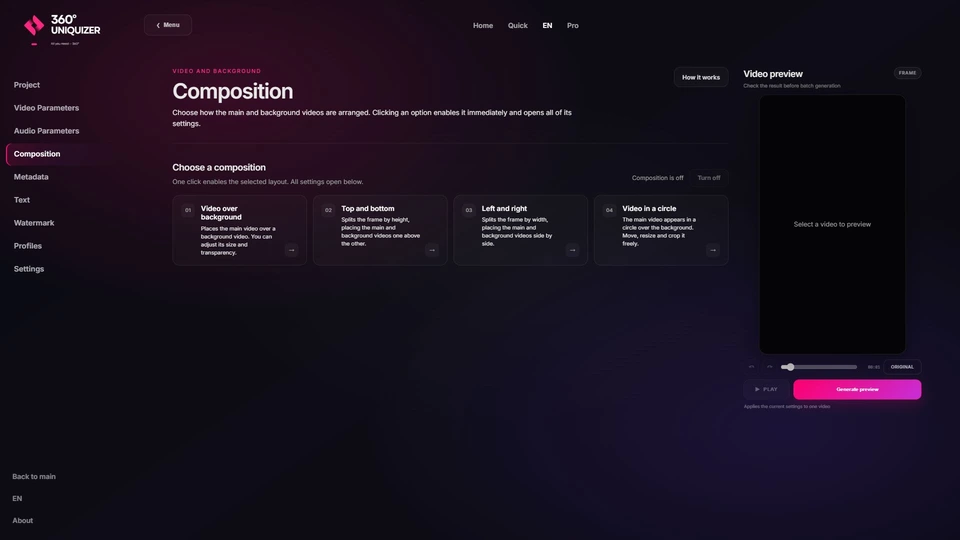 Background, Picture-in-Picture and Split Screen
01
Folder backgrounds or built-in generator
Use your own background videos or generate them in the app. Six styles are available, including stripes, grid, checkerboard, spiral and particles.
02
Four composition modes
Place video over a background, split the frame vertically or horizontally, or use the new circular layout. Move and resize the circle and adjust the crop inside it.
03
Text directly on the preview
Enter copy, drag it to the right position and resize it in the visual editor before starting the batch.
04
Image or video watermark
Use an image or video as a watermark and adjust its position and scale directly on the preview.
05
Fresh metadata for every version
Generate device brand and model, software, date and time values for the output files.
Your background, video position, text and watermark settings are applied consistently while every new version is saved automatically.
Turn one photo into a ready batch of versions
Add one image or an entire folder, choose how many versions you need and set the processing depth. The app varies every copy separately and saves the finished batch to your selected folder.
01
Choose a photo, folder and version count
Process a single image or use source files from a folder. Set from 1 to 1,000 output versions for each photo and choose the save format.
02
Quick mode — start without manual setup
The app automatically changes scale and framing, adds subtle color variations and creates different versions without manual tuning of every parameter.
03
Advanced mode — precise range control
Set minimum and maximum values. Every new copy receives its own combination within those limits, and any effect can be disabled.
04
Add fresh EXIF data
Generate camera metadata for output images: device brand and model, software, date and time. Select a profile manually or let the app choose one randomly for each version.
Every version gets its own framing, visual changes and, when enabled, a new EXIF profile. Results are saved automatically to the folder you selected.
Plans and Pricing
Create up to 30 videos with your own files before paying. Paid plans include the same features and differ only by license term.
Test License
Upload your own file, configure the effects and evaluate the final result before paying.
Start FreeFree test · up to 30 videos
Sign in and test the software on your own creatives
An account lets us save your trial license and issue it directly in your dashboard.
- All core processing tools are available
- No payment card required for the test
Paid Plans
Every feature is included. Choose only the access period: a short term for a live test or a longer term for ongoing creative production.
Earn With Us
Invite friends — earn 20% from every purchase they make, forever
Sign Up
Create an account and get your personal referral link
Invite Friends
Share your link — in social media, chats, anywhere
Earn Commission
20% from every purchase of each referred user — lifetime
Free registration — start right now
Download 360° Uniquizer
Ready to start? Download the program right now!
System Requirements
- Windows 10/11 (64-bit)
- 4 GB RAM (8 GB recommended)
- 5 GB free space
- Processor: Intel i5 / AMD Ryzen 5 or higher
How to Install
Download the Program
One click on the button above — and the installer is yours. Fast, secure, free.
Install in 2 Minutes
Run the file and follow simple steps. No complex settings — everything works right after installation.
Activate Your License
Enter your key on first launch — and you're all set! The program activates instantly and works without limitations.
Create Unique Content
Upload videos, apply effects, and generate hundreds of unique versions with one click. Built-in guide helps you master it in 5 minutes.
Partners



User Reviews
I have used 360° Uniquizer for two months and already renewed. Telegram bots did not work for me because TikTok still found duplicates quickly. Here I upload one source, prepare 20 different versions for my accounts and publish without the usual stress. It saves a lot of time.
I chose 360° Uniquizer for Reels. The interface is clear and there are plenty of useful settings, so I can quickly prepare creative variations for different accounts.
My favorite tool for repurposing videos across my social channels — fast and reliable 💪✅
I had been looking for software like this for almost a year. Support replies quickly, and the large set of controls is easy to use. In my tests, social platforms treated the exports as new videos and reach stayed stable. I am very happy with the result.
Frequently Asked Questions
Is the program free?
360° Uniquizer is a paid program. However, you can test it completely free for 1 day with full access to all effects and features. Contact us to get a test license.
Is internet required for the program to work?
Yes, an internet connection is required for the program to work properly. This is necessary for license activation, checking updates, and correct operation of all program functions.
What is the video processing speed?
Speed depends on video length, hardware, selected effects and thread count. A single task can contain up to 10,000 output versions, while processing can use up to 32 parallel threads.
How many computers can I use one license on?
One license is activated on one computer. If you need to work on multiple devices simultaneously, purchase additional licenses. To transfer a license to another computer, contact support - we'll help rebind the key.
How does uniqueness checking work?
The built-in system analyzes key video parameters and compares created versions with each other. If similarity is too high, the program automatically creates a new version with a different effect combination. This ensures each video is unique enough for publication.
Is there a macOS version?
360° Uniquizer currently runs on Windows 10/11 and Windows Server. On a Mac, you can use it through a Windows VPS or a virtual machine such as Parallels or VMware.
Is there training for the program?
The program has a built-in detailed user guide with descriptions of each effect and work instructions. The interface is intuitive - you'll master the basics in 5-10 minutes. For complex questions, Telegram support is available.
Is 360 Uniquizer suitable for TikTok, Reels and Shorts?
Yes. It is built for affiliate teams and creators who prepare many versions of one creative for TikTok, Instagram Reels and YouTube Shorts. You get 35 video effects, 14 audio effects, batch processing and similarity checks, so every export is a newly processed file rather than a simple duplicate.
How much does a 360 Uniquizer license cost?
Plans: 7 days — $12.99, 30 days — $24.99, 90 days — $69.99, 1 year — $199.99. A free 1-day trial with full access is available. Pay by card or crypto in your personal account.
How is video variation different from simply trimming a video?
Trimming only changes framing — TikTok and Instagram algorithms still detect duplicates. 360 Uniquizer changes dozens of parameters: color, speed, noise, metadata, audio and frame structure. Built-in checks compare versions to keep similarity below platform thresholds.
News & Articles
Practical guides on TikTok, Reels, Shorts, organic affiliate traffic and content scaling. The latest posts are shown here; the complete library is available in the article hub.
Keep in touch
Follow our channel for product news and practical guides. Our support team will help with setup, your license and the app.